
CoderPad Screen API
CoderPad Screen API
Documentation for the CoderPad Screen API (formerly known as CodinGame for Work)
Version
This is the documentation for version v1.1 of the API which is the latest version available.
API version will be incremented for any breaking changes.
WARNING: over time, new fields may be added to the responses JSON objects for this version of the API.
This does not constitute a breaking change and the version of the API will NOT be incremented.
Please, make sure your deserialization code does not break when a new field is added to a response JSON object.
Server selection
If you're using our EU server, you'll need to ensure the basepath is set to https://www.codingame.eu. Otherwise, if you're using the US server, your basepath will be https://screen.coderpad.io.
Authentication
An API key must be declared in the http headers of each request. The name of the header parameter is API-Key.
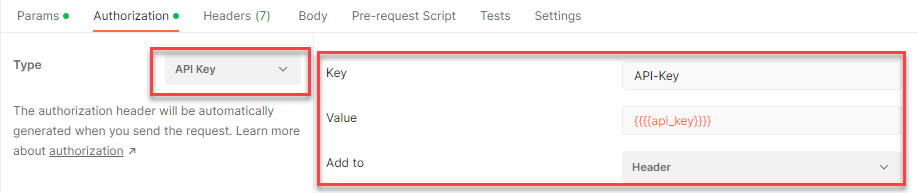
If the API key is invalid, the request will produce a 401 error.
Once you have received your API key, you can pass it in the header of the requests, for instance:
curl --header "API-Key: your_api_key" https://screen.coderpad.io/assessment/api/v1.1/campaigns
API Key Access
API Key Access
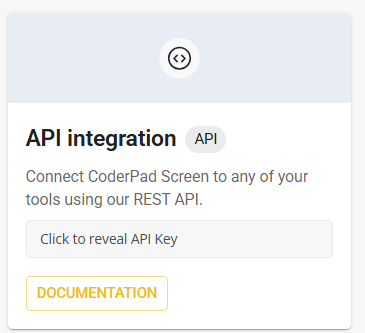
To access your CoderPad Screen API key, click the Integrations option under the Settings menu. At the top left of the screen, use the API integration tile to access your key.
Errors
The API uses standard HTTP status codes to indicate the success or failure of the API call.
The body of the response will be JSON in the following format:
{
  "code": "specific code for the error",
  "message": "explanatory message"
}
Error codes can be InvalidTestId, NotFoundTestId, InvalidCampaignId, BadCandidateEmailFormat, BadRecruiterEmailFormat, CandidateNameTooLong
depending on the request.
The error code is required while the message is optional.
Updated about 1 month ago